
A CRM that counts the work, not just the deals.
Optimized Star CRM tracks every call, text, appointment and follow-up against a daily goal for each department. Managers see who's on pace while there's still time in the day to do something about it.
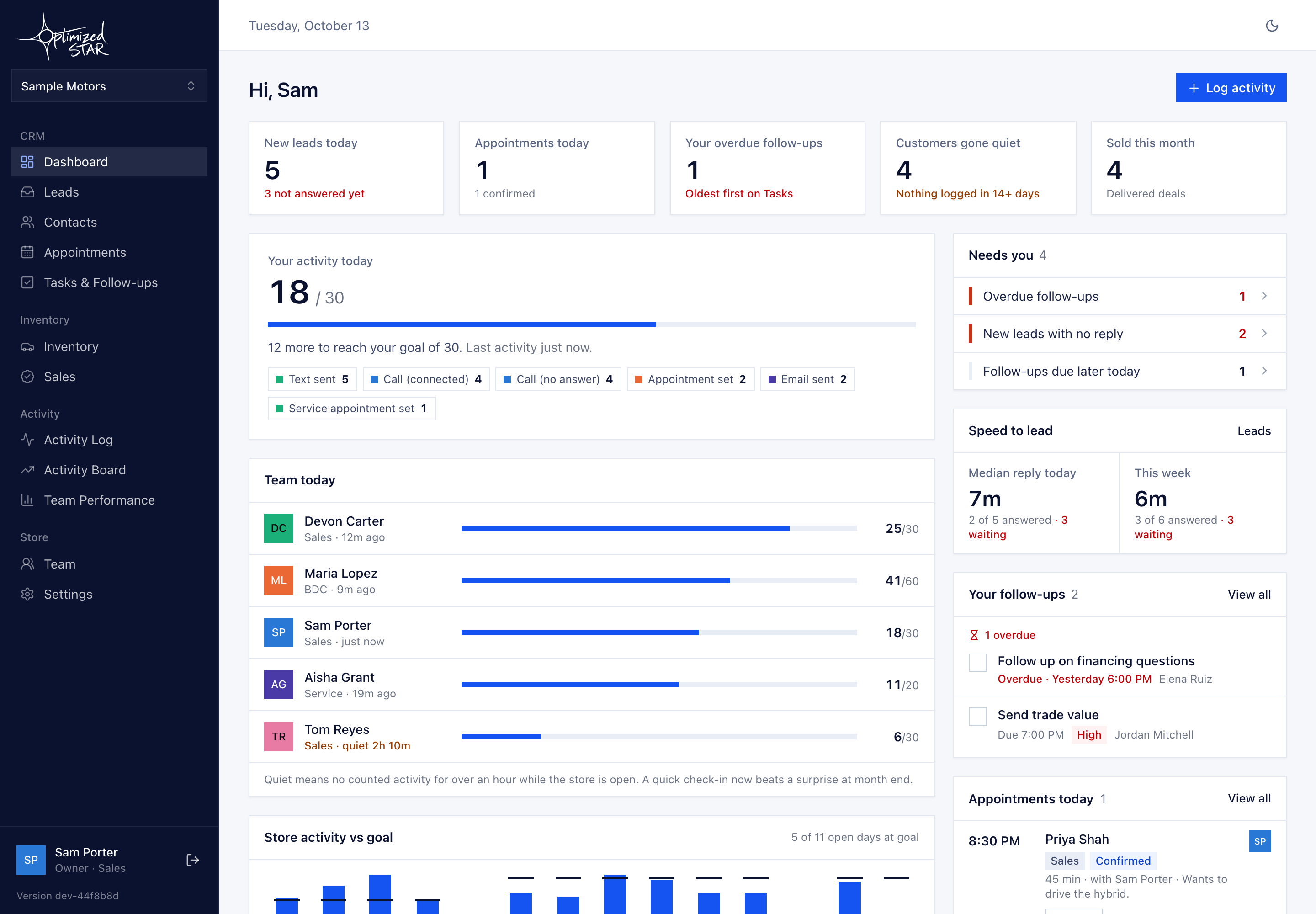
Activity breeds activity.
Sales come from the work that happens before them. Track that work every day and you're tracking progress. The CRM counts activity against a goal. Every activity that counts is one activity. No weighting, no formula.
Count what people do
Outreach and results count: calls, texts, emails, appointments set and shown, test drives, sold units, follow-ups completed. Notes and inbound messages don't.
A goal for each department
BDC, sales, service and F&I each get a daily number. Each store sets its own. The starting goals are below.
See it today, not at month-end
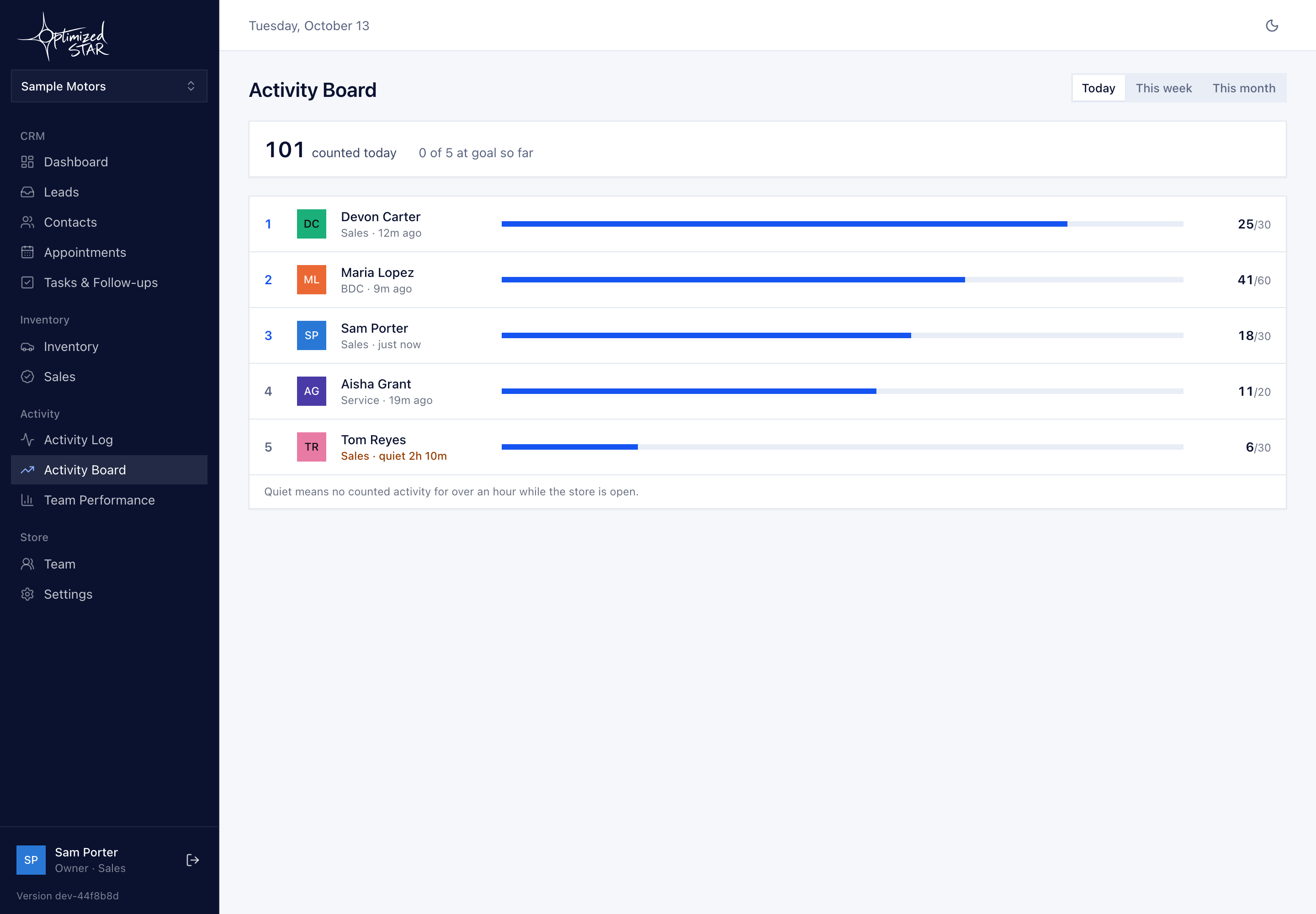
The dashboard and activity board show who's on pace right now, so a manager can step in at 2pm instead of finding out on the 30th.
Goals are counts. That's the whole system.
One number per person per day. Hit it and the day is done. Miss it and everyone can see why: the activity log shows exactly what was done.
| Department | Starting daily goal | Typical activity |
|---|---|---|
| BDC | 60 | Calls, texts and emails to new and aged leads; appointments set |
| Sales | 30 | Follow-up calls, appointments shown, test drives, sold and delivered |
| Service | 20 | Service appointments set, follow-up calls, service-to-sales handoffs |
| F&I | 10 | Calls, texts, appointments and post-sale follow-ups |
What it does
Activity tracking
Calls, texts, appointments and follow-ups counted against a daily goal for each person.
For the BDC
The highest daily goal in the store, a live board, and every lead's next step in one list.
For sales
Appointments set and shown, test drives, be-backs and follow-ups that don't slip.
For service
Service appointments, follow-up calls and the handoff from the drive to the sales floor.
For F&I
Its own daily goal, and a clear view of the customers F&I touches after the deal.
Lead response
Replying to a lead counts as activity. Automatic intake with a response clock is coming next.
What's built, and what's next
We'd rather tell you what isn't done than have you find out in week two.
Built and in the pilot
- Contacts list and detail, with every activity on one timeline
- Quick-log for calls, texts, emails and appointments
- Appointments, tasks and an activity log
- Spreadsheet import for your existing customer list
- Dashboard: today's activity against goal
- Activity board and team performance (days at goal, averages, streaks)
- Settings for goals, what counts, store hours and who sees what
- Team invites, with goal and member changes audited
On the roadmap, in order
- Automatic capture: Gmail and Microsoft 365 sync, calendar, and an ADF/XML lead inbox
- Phone & text: calling and texting inside the CRM, with 10DLC registration done before any customer texting
- DMS connections: file imports first, then DealerCenter
- Toward a DMS: deals, F&I and inventory on the same data
We'll share dates for each phase as they firm up.
Your data
Your customers stay yours. Every store's data is walled off in the database itself, not just hidden on screen.
Hand-logged activity is marked as self-reported. Once automatic capture arrives, activity from connected systems will be marked verified, so managers know which is which.
No SSNs, driver's license numbers or credit data. The CRM doesn't store them.
See how it would work at your store.
Book a 30-minute walkthrough of the CRM with sample data and, if you want, a look at your website.